Driver App
The Driver Portal upgrade brings novated lease management into a single mobile app. Drivers can see where their lease is up to, what they have set aside from their pay, what they are spending by category, and what their next car could look like, all from their phone. The goal is to give drivers control and clarity and to remove the friction of managing a novated lease. The app is fully customisable per customer, so branding, colours, logo, and naming can be configured.
Launch and sign-in
Drivers sign in with either their email or mobile number, then verify with a biometric scan or a one-time code sent to their mobile. There are no passwords to remember, and the account stays secure. Sign-in drops the driver straight into the home dashboard.
Home dashboard
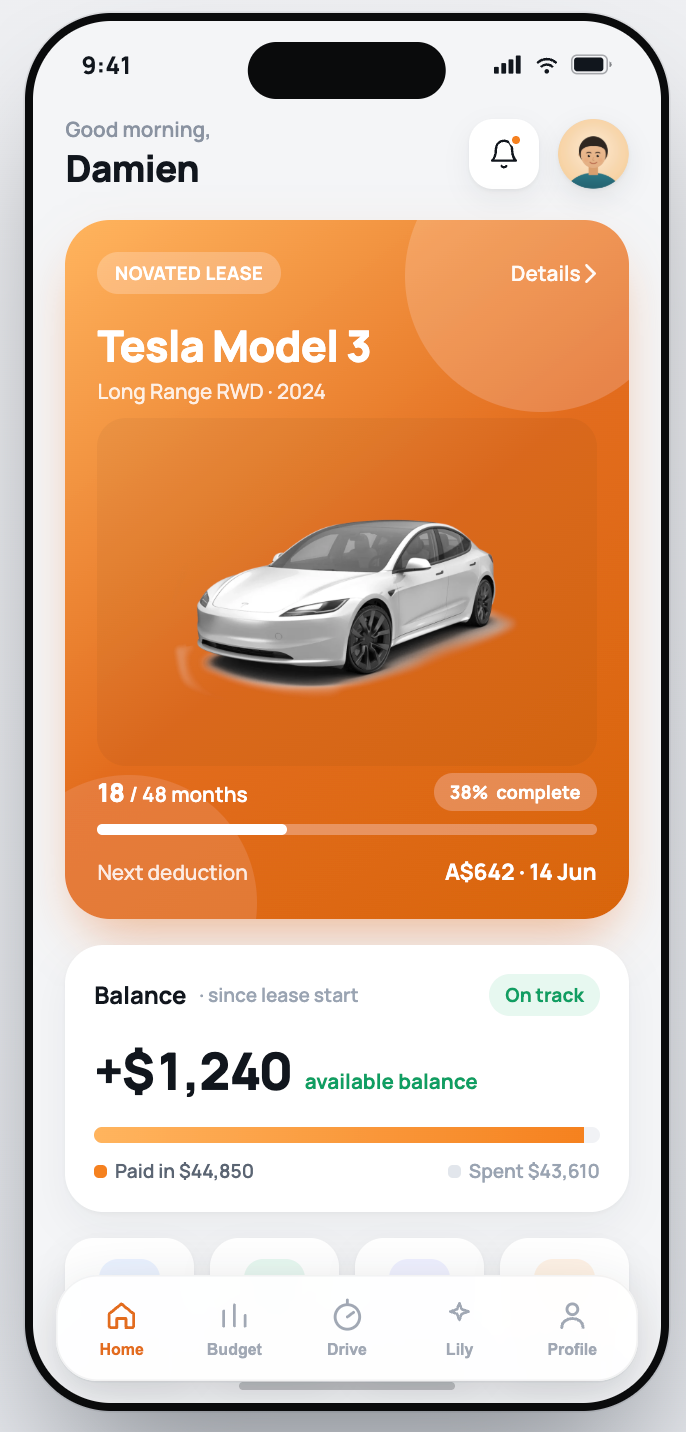
The dashboard is the hub of the app. It shows where the lease is up to, how much the driver has set aside from their net pay, and a summary of their active vehicle. An insight carousel across the top rotates through timely prompts so useful information surfaces without the driver going looking. A notification bell carries an unread indicator when something needs attention. Quick actions cover the everyday tasks: log kilometres, add a claim, ask Lily, and refer a friend. From the dashboard, drivers can jump straight into their lease, statements, claims, upgrade options, and maintenance.
Budget and spend management
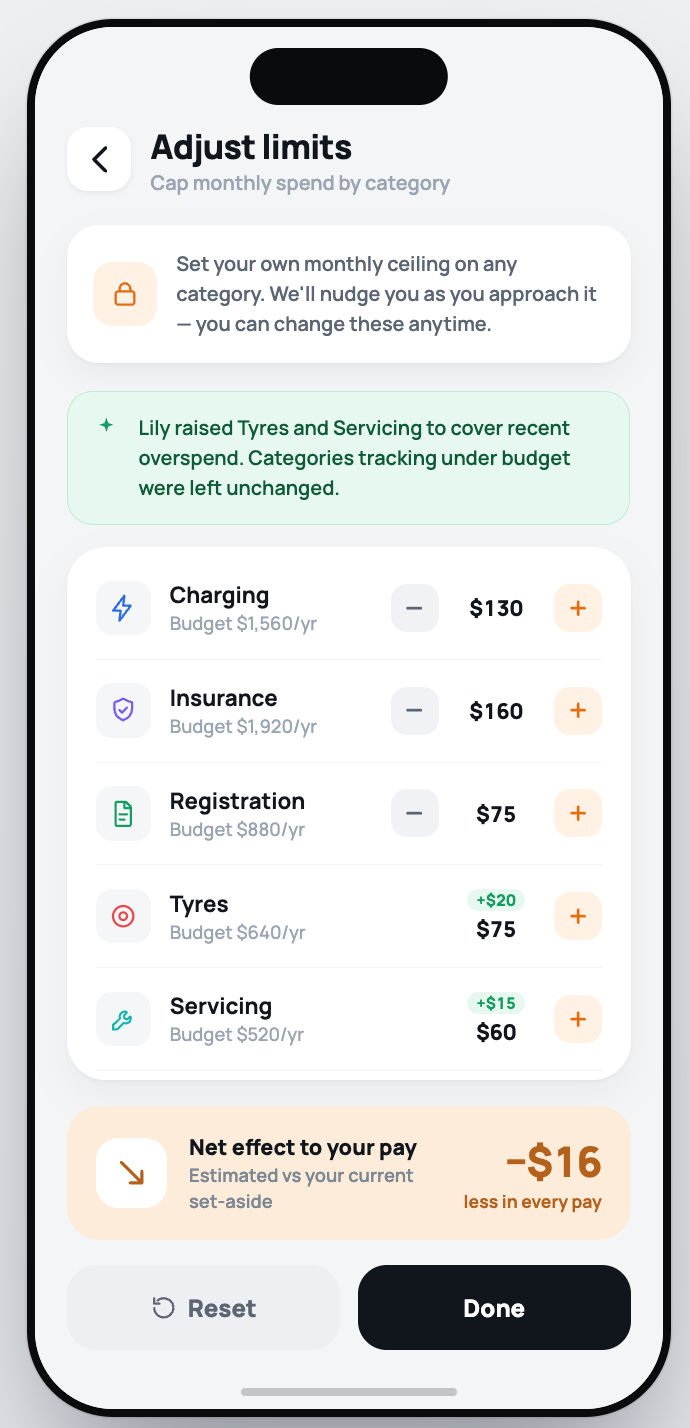
Each running cost has its own budget, including fuel, tyres, and servicing. Live spend is shown against each category with a simple over or under indicator. Tapping a category opens the transactions behind it for full transparency. A Top up option uses AI to rebalance the budget, lifting only the categories that are over budget and leaving the rest alone, with a clear summary of what changed and why. Because any budget change affects take-home pay, a pay-impact preview is shown before anything is committed.
Drive and vehicle tracking
Drivers log odometer readings in a moment, and every reading is kept as a full history. From those readings, the app projects annual kilometres and forecasts where the driver will land by the end of the lease year, which matters because kilometres drive the whole lease calculation. When a service is coming due, the app prompts the driver with a notification.
AI assistant (Lily)
Lily is the in-app AI assistant. Drivers can ask questions in plain language and get answers about their own lease, with a dedicated tab in the app.
Claims
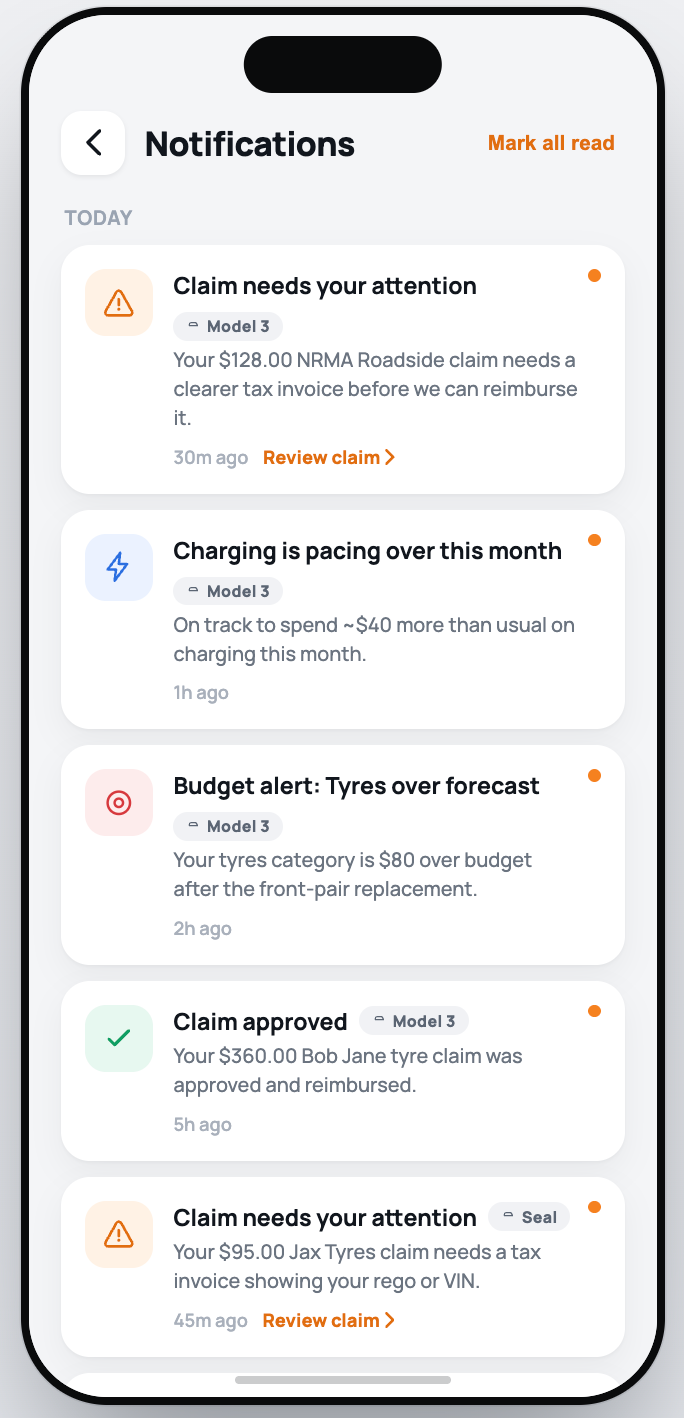
Claims are how a driver gets money back for running costs. To add a claim, the driver captures the receipt, and the app reads it and pulls out the details automatically, keeping typing to a minimum. If a claim needs checking, it receives a clear “needs-attention” flag with allowing the user to review their claim. Opening a claim shows the full detail along with any supporting documents. A complete, filterable claims list lets drivers separate recent claims from those still needing action.
Vehicle marketplace
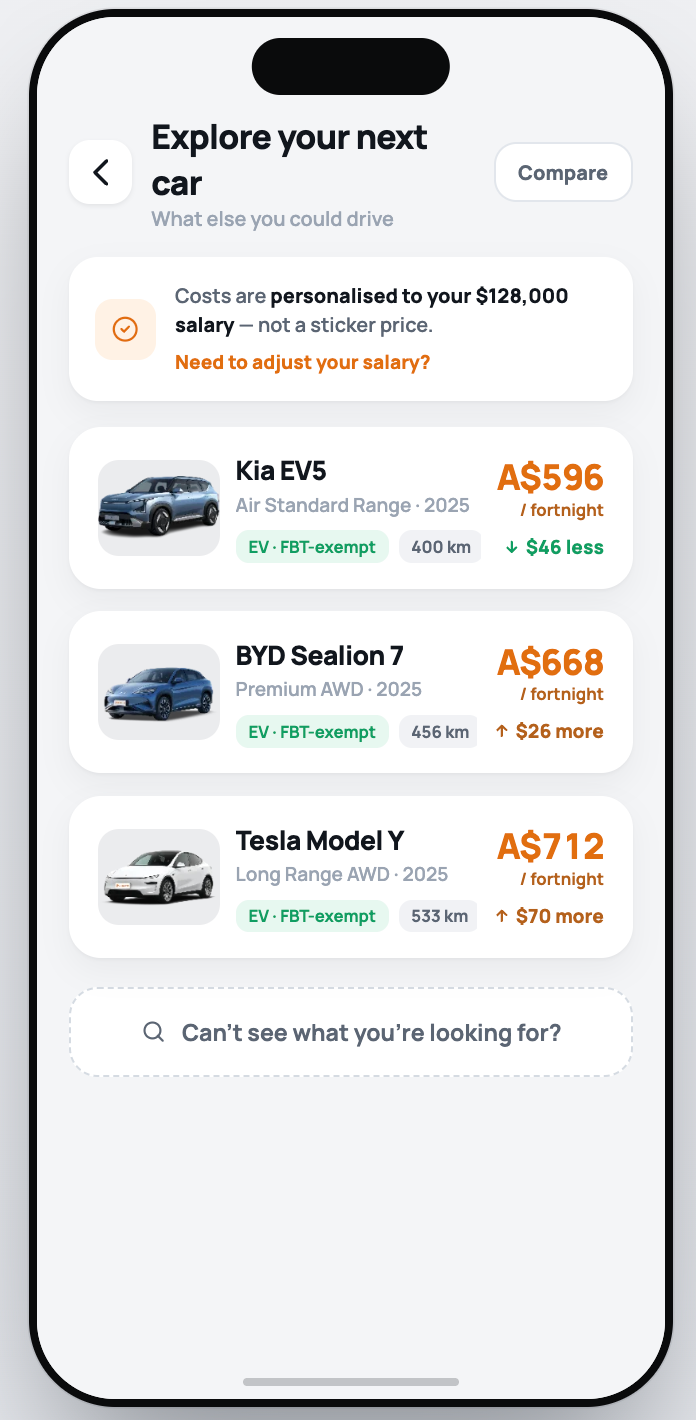
“Explore your next car” provides the driver customisable suggestions personalised to their salary, each showing the cost and the impact on their pay up front. “Find a car” opens the full catalogue, with search by text, filters for body type, price band, and electric-only, and sorting options. Compare mode allows drivers to see full specs of multiple vehicles plus an annual-kilometre slider that updates the personalised fortnightly cost live, along with the difference against the driver's current car. When ready, one tap sends an enquiry.
Lease and statements
The lease overview gives a clear summary, and the driver can open the full agreement for detail. The latest statement is available to download as a PDF in a tap. Your novated saving shows how much the driver has saved to date by packaging their car, broken down into savings per pay, a chart of how the saving has grown over time, and where the saving comes from.
Switch vehicle
Drivers who package more than one car can switch between them easily. Each vehicle card shows the vehicle name and net cost, a “Viewing” pill marks the car currently in view, and an “Action required” badge appears when a car has claims needing attention. Switching re-scopes everything to that vehicle, including budgets, claims, and statements, so each car is managed in its own space.
Notifications
The notification feed is grouped into Today and Earlier, with unread dots showing what is new. Tapping an actionable item takes the driver straight into the relevant part of the app, whether that is a claim to review or a service to book. Mark all read clears everything in one go.
Profile, preferences and referral
Preferences and settings live in a simple overlay where a driver manages their own details, including email, phone number, salary, and other personal information. Refer a friend gives each driver their own code and link to share or copy in a tap.
- Who Benefits?
- Everyone
- Business Impact
- Product Category
- Priority
- High
- How valuable is this feature to you? (1-Low, 5-High)
Log in to comment and vote
Comments3
Aqua Volcano
Jul 14
•Merged request
•5 votes
Driver Usage, Cost & Compliance Scorecard (Driver Portal)
A new feature for the Drivers portal that provides drivers with real-time visibility into lease usage and budget trends:
Kilometres vs contracted kilometres
Fuel/electricity usage
Servicing, tyres, and consumables
Spend vs budget and emerging overrun risk
Trend indicators and MoM / QoQ / YoY comparisons
This shifts the Driver Portal from a transactional to a decision-support model, reducing unexpected lease variations with additional items like:
Driver compliance scoring
Insurance/missing-doc detection
Integration with Linxio for behaviour and safety scoring
Adam Racovalis
Jun 21
@Damien.Miller great feedback, merged into Driver Portal ticket.
Crimson Toaster
Jun 21
•Merged request
•1 vote
Driver portal - customer self serve options
With the driver portal, can we have a Driver Details section where the customer can update their Address, phone number, Rego etc. and any other details relevant to be easily updated as a self-service feature.