Contract Group Filter for Scheduled Billing
Contract Group Filter for Scheduled Billing
Overview
The Combined Billing and Periodic Billing scheduler methods now support a Contract Group filter, so you can run separate scheduled billing jobs for Fleet contracts and Novated Lease contracts — each on its own invoicing cadence — without any manual intervention.
Note: This is separate from the existing on-screen "Group" filter available on the interactive (non-scheduled) Combined and Periodic billing screens, and from the fixed Fleet Managed-only filter on the periodic fee-billing screen. Those filters are unchanged.
How It Works
Open a scheduled job for Combined Billing or Periodic Billing — either creating a new job or editing an existing one.
A new Contract Group field appears, with three options:
-- All --,Fleet, andNovated.New jobs default to
-- All --, so no filtering is applied unless you change it.Choose
Fleetto include only contracts that aren't classified as Novated, orNovatedto include only Novated Lease contracts.
Save the job — the selected Contract Group value is retained the next time you open it for viewing or editing.
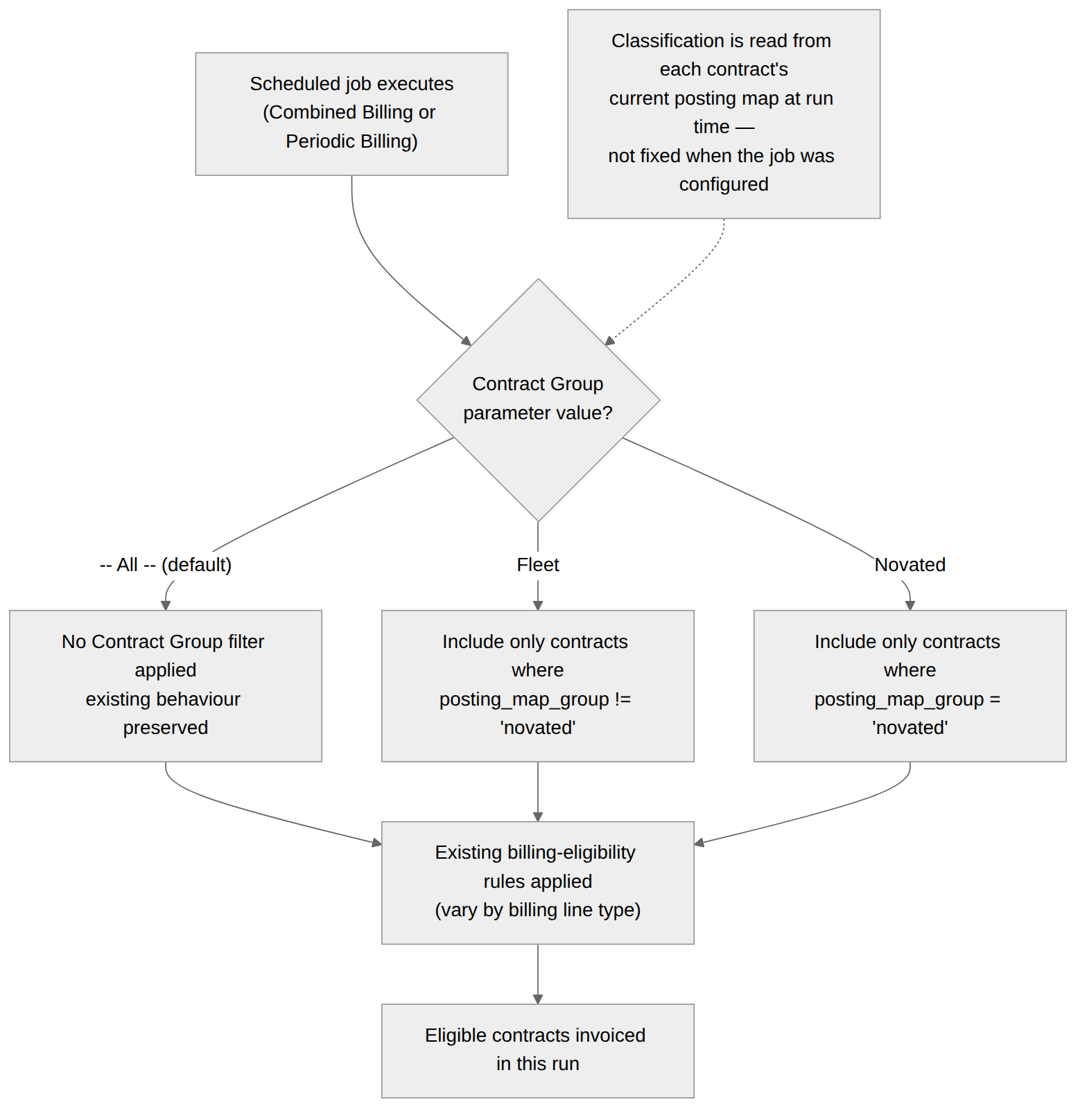
You can configure multiple jobs for the same billing method with different Contract Group values and different run schedules — for example, one job set to Fleet running monthly on the 1st, and a separate job set to Novated running periodically throughout the month.
Each time a job runs, contract classification is checked fresh against the contract's current posting map, and the billing method's existing eligibility rules are then applied as normal.
Expected Behaviour
Default Behaviour (-- All --)
Leaving Contract Group set to
-- All --applies no filtering — contracts of every classification are considered for invoicing exactly as they were before this change.
Fleet-Only Filtering
Setting Contract Group to
Fleetincludes only contracts that are not classified as Novated. Novated contracts are excluded from that run.
Novated-Only Filtering
Setting Contract Group to
Novatedincludes only contracts classified as Novated Lease. All other contracts are excluded from that run.
Jobs Run Independently of Each Other
A Fleet job's outcome is unaffected by the existence, schedule, or last-run status of a separate Novated job for the same billing method, and vice versa. Each job only considers the contracts matching its own Contract Group setting.
No Matching Contracts
If a job's Contract Group filter matches no eligible contracts on the run date, no invoices are created for that run — the same "nothing to invoice" outcome recorded for any other filter combination today.
Classification Is Evaluated at Run Time
A contract's Contract Group classification is read from its current posting map at the moment the job runs, not from whatever it was when the job was configured. If a contract is reclassified after the job was set up, it's billed under its classification as of the run date.
New Jobs Default to -- All --
When creating a new scheduler job for either billing method, the Contract Group field is pre-selected to
-- All --.
Saved Values Persist
Once a job is saved with Contract Group set to
FleetorNovated, reopening that job for viewing or editing shows the saved value.
Pre-Existing Jobs Are Unaffected
Scheduled jobs that were configured and saved before this change continue to run exactly as if Contract Group were set to
-- All --. Their other saved parameters are unaffected.
Fleet and Non-Billing Recharge, Fuel, and Toll Lines
Because "Fleet" is defined as every contract that isn't Novated, a Fleet-filtered Combined Billing job behaves identically to
-- All --for non-billing contracts' recharge, fuel, and toll transactions — these continue to be picked up exactly as an unfiltered run would include them.
Was this helpful?
Still need help? Ask the team